The term "mock API" comes up often in application development. So what is a mock API, and how do you create one?
What is a mock API?
A mock API is a technique for creating simulated data that reproduces the behavior of a real API, for testing, development or other purposes, without having to call a real API or wait until a real API is deployed.
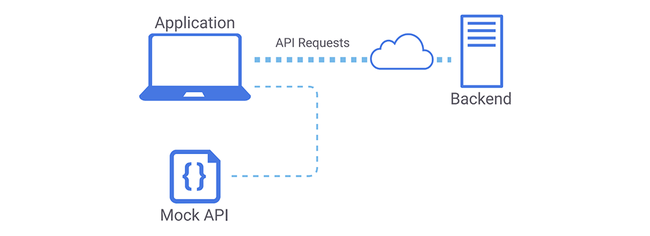
Mock APIs in software development
Mock APIs are used extensively in software development because they let developers run tests without connecting to the real service, which limits security risk and delay.
Minimize delay:Using mock APIs for interaction testing reduces delays during software development.
Reducing security-related risk:With a mock API, developers can run tests without connecting to live services, which reduces the security exposure involved.
Large library of ready-made Mock APIs:The range of mock API libraries and services is large and ready to use. For example, connect-api-mocker or Castle Mock can be used to create fake APIs.
Popular tools for creating a mock API
A mock API is a simulated API for a website, and to create one, developers can use any of the following tools:
MockAPI: Tạo Mock API với công cụ này khá đơn giản, bạn chỉ cần tạo ra các endpoint giả lập và thêm dữ liệu để trả về. Ngoài ra, MockAPI còn cung cấp cho người dùng tính năng phân quyền, mã hóa dữ liệu và quản lý API.
Postman:This is a capable tool for creating and managing mock APIs: users can create mock APIs for an endpoint and check how they behave.
Swagger: An effective API and mock API platform: create simulated endpoints easily and test them yourself in the browser.
WireMock:Among the tools for building mock APIs, this is the most popular and most widely used. It lets you simulate an endpoint in a range of states and then inspect the API's requests and responses.
Create a mock API server with Postman
Tạo Mock API server trên Postman không quá khó, chỉ cần làm theo hướng dẫn dưới đây của Bizfly Cloud:
Step 1:Create a new API collection
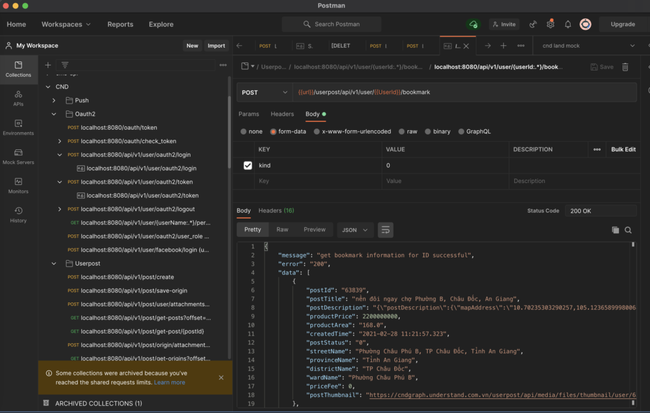
Step 2:In the API collection you just created, create a new request and select Mock mode
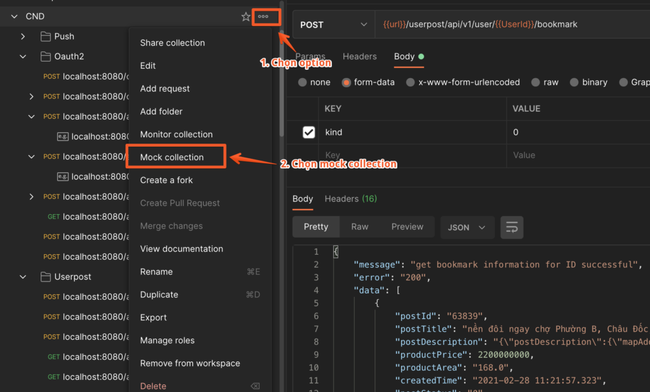
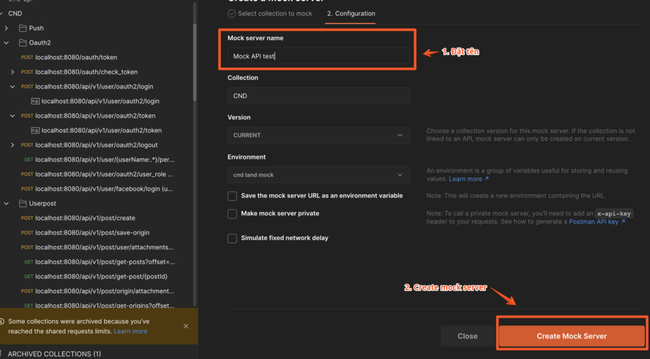
Step 3:Select “Create a mock server” to configure the mock server's settings, name, description and the OpenAPI object to register.
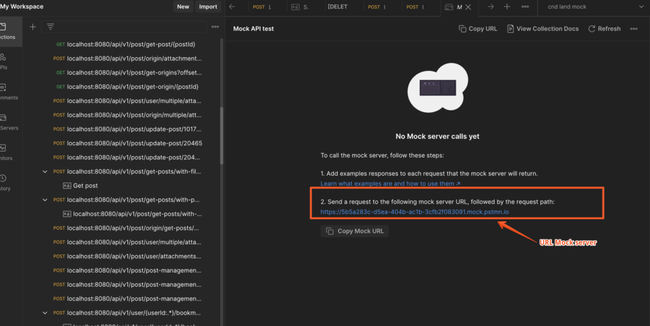
Step 4: Copy URL Mock server
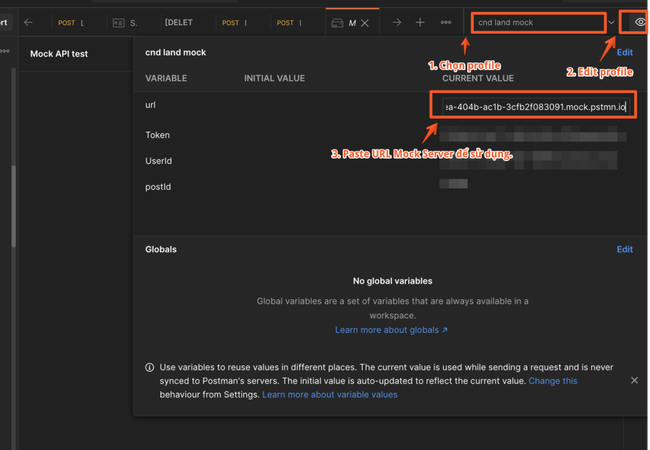
Step 5:Update the configuration with the new URL to simulate a real server
Step 6: Thêm các mẫu Mock response bằng cách thêm các file định nghĩa service (WSDL, WADL, Swagger) hoặc nhập thủ công các file JSON, XML hoặc CSV để thử nghiệm API giả
Step 7:Send a request to test the mock APIs.
Dynamic routes in Mock API
Dynamic routes in a Mock API are a technique for creating different API endpoints from a single template. For example, rather than creating multiple endpoints to fetch a user's details, create one /users/:id route and pass in the ID parameter.
How to use dynamic routes in Mock API
To create mock APIs, you need to configure mock endpoints that correspond to the dynamic routes, and to pass parameters in the request when testing the API.
Example:
Use json-server-router to define a /users/:id endpoint as follows:
“`
const jsonServer = require(\’json-server\’);
const router = jsonServer.router(\’db.json\’);
const bodyParser = require(\’body-parser\’);
const _ = require(\’lodash\’);
function findById(db, id) {
return _.find(db.users, { id: parseInt(id) });
}
router.render = (req, res) => {
const db = res.locals.db;
const data = res.locals.data;
if (req.method === \’GET\’ && req.params.id) {
const user = findById(db, req.params.id);
res.jsonp(user);
} else {
res.jsonp(data);
}
};
router.db._.id = \’id\’;
const server = jsonServer.create();
server.use(bodyParser.json());
server.use(\’/api\’, router);
server.listen(3000);
“`
In the code above, the findById function looks up a user by ID in the database, and the render function returns the details of the user with that ID. Next, create the dynamic route /users/:id and register it on the server's /api endpoint.
To fetch a single user by ID, call the route http://localhost:3000/api/users/1; to fetch all users, call the route http://localhost:3000/api/users.
Unit testing with AspectMock and Mock API
AspectMock and its role in unit testing
AspectMock is an optimized PHP mocking framework that lets you use conventional methods to mock objects that otherwise cannot be mocked.
How to use AspectMock for unit testing
Step 1: Install AspectMock
Add the following lines to the `composer.json` file
“`json
{
\”require-dev\”: {
\”codeception/aspect-mock\”: \”*\”
}
}
“`
Run the `composer update` command
Step 2: Create a test case
Example:
“`php
use AspectMock\\Test as test;
class MyTest extends \\PHPUnit\\Framework\\TestCase
{
public function testSomething()
{
$object = new MyObject();
$mock = test::double($object, [\’getName\’ => \’mockedName\’]);
$this->assertEquals(\’mockedName\’, $object->getName());
}
}
“`
In the code above the object is `MyObject` and the mocked method is `getName()`, so AspectMock will return the value `mockedName`.
Step 3: Run the test
Run `phpunit` so AspectMock applies the mocks and returns the stubbed values where defined.