The Paracel and Spratly Islands are an inseparable part of Vietnam's territory.

  • Blog & promotions
  • Contact
  • Account
    • Log in
    • Sign up
  • EN
    • Vietnamese
    • English
    • 日本語
    • 한국어
    • 简体中文
HiTechCloud
HiTech Cloud
  • Domains

    A great domain makes a strong brand

    View details
    Register a domain

    Register a domain

    A great domain makes a strong brand

    Domain lifecycle lookup – domain WHOIS

    Domain lifecycle lookup – domain WHOIS

    Domain lifecycle lookup - Domain WHOIS

    IT.COM domains

    IT.COM domains

    A premium domain for the information technology industry

  • Cloud computing

    Cloud computing

    Services on dedicated infrastructure, delivered in whichever model fits the customer's needs.

    Cloud Server 2026

    Cloud Server 2026

    Next-generation cloud infrastructure with outstanding performance

    Cloud Server AMD EPYC™

    Cloud Server AMD EPYC™

    Peak performance on AMD EPYC™ and NVMe storage, ready for AI workloads

    Dedicated Private Cloud

    Dedicated Private Cloud

    High-performance private cloud that meets the security and compliance needs of large enterprises

    VMware Virtualisation

    VMware Virtualisation

    VMware virtualization that optimizes cost and availability for your business

    Cloud VDS

    Cloud VDS

    High-performance virtual private servers at an optimized cost

    Cloud Server OpenClaw

    Cloud Server OpenClaw

    A personal AI assistant that automates work and runs securely on your own infrastructure

    Cloud Hermes Agent

    Cloud Hermes Agent

    A self-learning, self-scaling AI agent that runs on your own Cloud Server

    Auto Scaling

    Auto Scaling

    Scale Elastic Compute up or down with actual load

  • DevOps

    Infrastructure designed to help customers build and deliver reliable cloud services and cost-effective DevOps practices.

    View details
    Cloud Instances

    Cloud Instances

    Flexible cloud servers for business

    vCloudstack

    vCloudstack

    Private cloud for your business.

    Managed Services – IT infrastructure management

    Managed Services – IT infrastructure management

    Deploy and operate IT systems

    Managed Kubernetes Service (vMKS)

    Managed Kubernetes Service (vMKS)

    Deploy applications fast on Kubernetes, fully managed by HiTechCloud

  • Licensed software

    Remove risk and run reliably on genuine international software licenses at Vietnamese prices

    View details
    Microsoft software

    Microsoft software

    Microsoft 365, Office, Windows, Microsoft SPLA, and AI Cloud Solutions

    cPanel/WHM

    cPanel/WHM

    A professional hosting control panel

    DirectAdmin

    DirectAdmin

    High performance, with easy management of websites, email, DNS and servers

    Plesk

    Plesk

    A cross-platform hosting control panel

    CloudLinux

    CloudLinux

    Optimize hosting performance and security

    JetBackup

    JetBackup

    Backup for hosting

    Imunify360

    Imunify360

    Complete hosting server security

    LiteSpeed Enterprise

    LiteSpeed Enterprise

    A high-performance web server

  • Partners & resellers

    HiTechCloud is committed to long-term partnership and shared growth

    View details

    Partner network

    The vendors and providers behind each layer of HiTechCloud services

    Partner & reseller program

    Partner & reseller program

    HiTechCloud is committed to long-term partnership and shared growth

    Affiliate program

    Affiliate program

    Refer users to HiTechCloud services and earn competitive commission.

  • About HiTechCloud

    About HiTechCloud

    View details
    About

    About

    Hello, we are HiTechCloud

    Technology

    The technology groups HiTechCloud runs, and the certifications behind them

    Internet resources

    IPv4, IPv6, ASN and BGP routing

    Success stories

    Success stories

    HiTechCloud Success story

    Our direction

    Our direction

    HiTechCloud development orientation

    Company profile

    Company profile

    HiTechCloud company profile

    Blog & promotions

    Blog & promotions

    Blog and promotions from HiTechCloud

    Contact

    Contact

    Contact us for 24/7 support

    Careers

    Career opportunities across the group

HiTechCloud
EN
VietnameseEnglish日本語한국어简体中文
Account
Log inSign up

How to create and use an SSH key

ByHiTechCloud 11/01/202511/01/2025

Here is a brief explanation of SSH keys and why they are used

Let us start by clarifying what SSH is. SSH, short forSecure Shell, a security protocol that encrypts data in transit between your computer and the server, as shown in the diagram below.
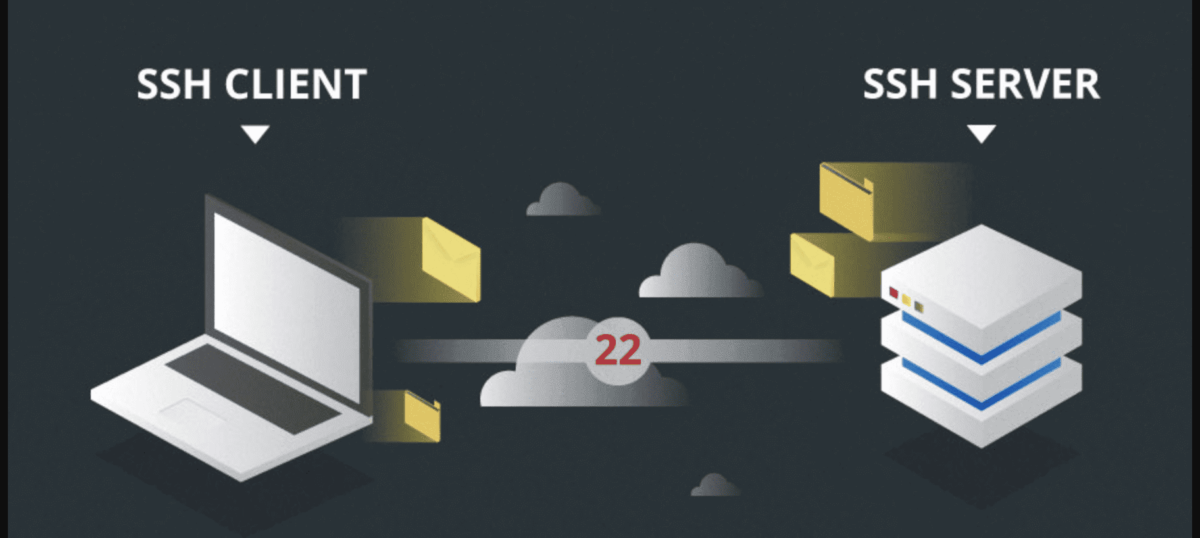
SSH connection

Normally, to connect to a server you use the root password to log in over SSH. But is that really completely safe? From a system engineer's point of view, using the root password for SSH still carries plenty of risk. When your VPS is online, it easily becomes a target for attacks, especially password guessing by hackers. So how do you protect your server better? Let's look at how to useSSH Key– a more effective security solution.

SSH Key là một phương pháp authentication sử dụng cặp khóa bảo mật gồm Private KeyandPublic Key. You can think of it simply as:Public Keyis the lock, whilePrivate Keyis the key. The two keys are closely linked, ensuring that only someone holding the “key” can “unlock” access. When you generate an SSH key, you receive two files:

  • Public Key: Stored on a server or VPS.
  • Private Key: Stored on your own computer and held only by you.

This combination greatly reduces the risk of password-guessing attacks, because only those who havePrivate Keycan sign in. Even if it is accidentally exposedPrivate Key, you still have an additional layer of security calledPassphrase– a passphrase to protect the private key.

Given these benefits, using an SSH key is not just advisable but an essential step in strengthening the security of your server. Let’s create an SSH key and set up a secure connection.

How to create an SSH key

Many tools can generate an SSH key, but they all do essentially the same thing: create a key pair consisting ofPublic KeyandPrivate Key. In this section we will show how to create an SSH key onWindowsandLinux.

1. Using PuTTY on Windows

Install the support tool:

  • Download and installPuTTYgen

Using PuTTYgen:

Once downloaded and installed, open PuTTYgen to create the SSH key. Here you selectGenerateto create.
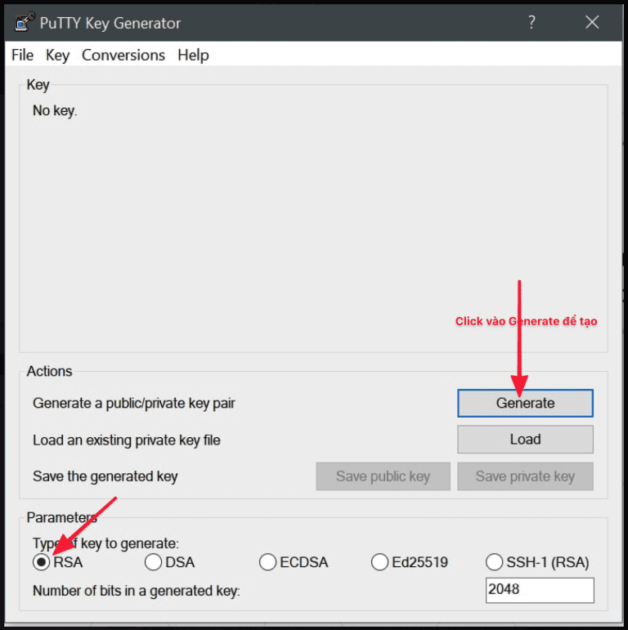
bnixvn doc screenshot 2020 12 22 at 2130182x 768x771png

Next,Move the mouse into this empty boxuntil the SSH key is created.
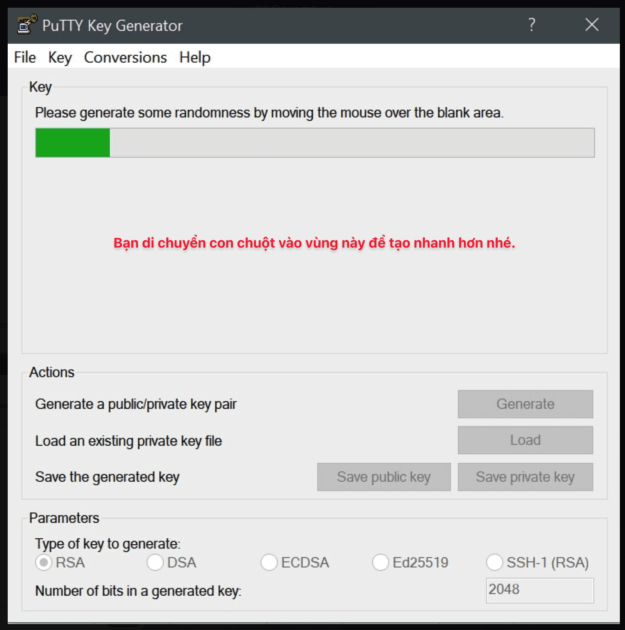
bnixvn doc screenshot 2020 12 22 at 2131242xpng

When you see the screen below, it has worked. But there is one more step: setpassphraseto open the private key. Enter a password of your choice in the fieldKey passphaseandConfirm passphase. Once you have finished entering it, clickSave private keyandsave public keyto save it on a personal machine.
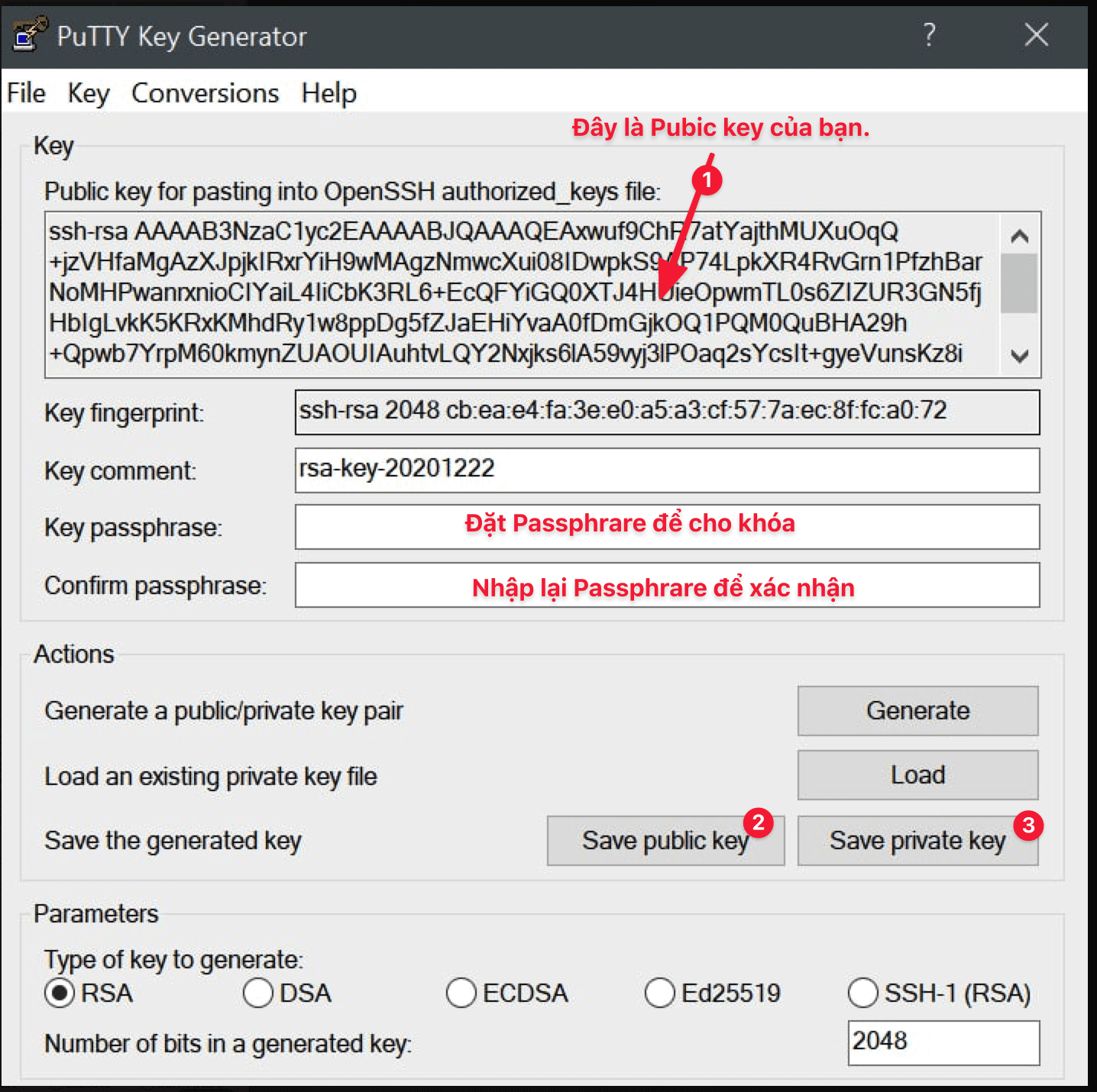
bnixvn doc screenshot 2020 12 22 at 2132072xpng

2. Using Windows Terminal to create an SSH key

OpenWindows TerminalorCommand Prompt. Run the command:

ssh-keygen -t rsa -b 4096 -C "your_email@example.com"

Save the key pair to the default folder (~/.ssh/) or choose a different location as you prefer.

Public Keylocated in the file.pubandPrivate Keyis the remaining file.

3. Using Linux/macOS

ForLinuxorMacOS, both of which are Unix-based operating systems, so the procedure and the commands for generating an SSH key are nearly identical. To create aPublic KeyandPrivate Key, you just need to follow the steps below:

Step 1: Open the windowTerminal.

Step 2: Run the following command

ssh-keygen -t rsa

Step 3: Follow the on-screen instructions:

  • Confirm where the key will be saved (the default is~/.ssh/id_rsa) or specify a different path if you prefer.
  • SetPassphraseto add protection to the private key (optional, but recommended).

Step 4: Get the SSH key

Once complete, you will receive:

  • Public Key: usually located in the file~/.ssh/id_rsa.pub.
  • Private Key: usually located in the file~/.ssh/id_rsa.

Guide to using an SSH key

Once you have created the SSH key in the steps above, follow the steps below to start using it.

Step 1: UploadPublic Keyto the server/VPS

First, log in to the server or VPS with root credentials (password). Then run the following commands in order:

mkdir ~/.ssh
chmod 700 ~/.ssh
touch ~/.ssh/authorized_keys
chmod 600 ~/.ssh/authorized_keys

Run the command below to copy the entire public key string you generated

nano ~/.ssh/authorized_keys
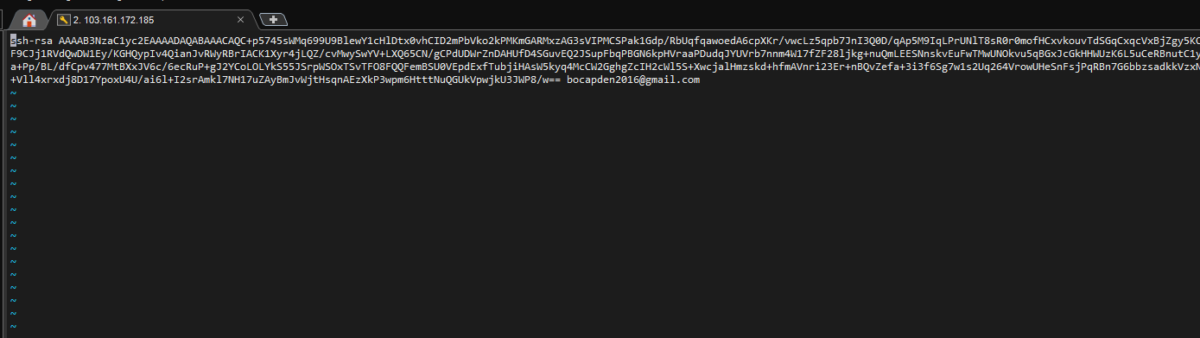
bnixvn doc 8f717f7a 7efa 46af 93dc 70a4c7901c11

Step 2: Configure SSH

Once you have configured your SSH key successfully, you should disable password login (PasswordAuthentication) to prevent password-guessing and brute-force attacks. The steps are as follows:

1. Open the SSH configuration file:
Use your preferred text editor to open the file/etc/ssh/sshd_config. For example, usenano:

sudo nano /etc/ssh/sshd_config

2. Find the PasswordAuthentication configuration line:
Find the line:

PasswordAuthentication yes

3. Change the state to “no”:

PasswordAuthentication no
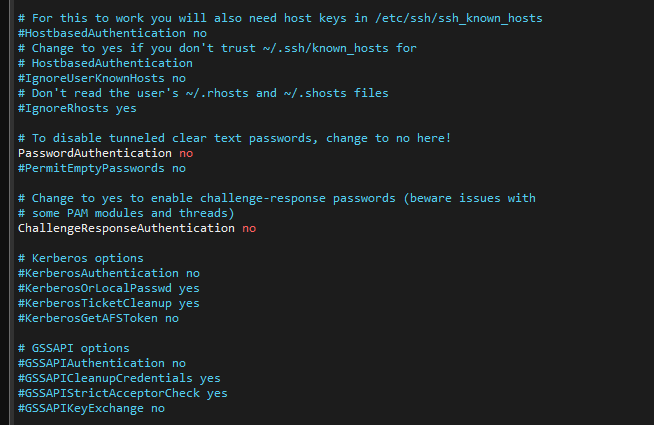
bnixvn doc a32b8dc8 7d29 45ce 956d b4f792c46224

4. Save the file and exit:
Withnano, clickCtrl + Oto save, then pressCtrl + Xto exit.

5. Restart the SSH service:
Apply the change by restarting the SSH service:

sudo systemctl restart sshd

Step 3:Using an SSH key

Using an SSH key onWindowsandLinuxthere are some differences. Below is a detailed guide to using an SSH key onWindowswith PuTTY.

Using an SSH key with PuTTY on Windows

  1. Open PuTTY:
    • Launch PuTTY, the common SSH client on Windows.
  2. Configure use of a Private Key:
    • In the PuTTY window, navigate toConnection > SSH > Authin the left-hand menu.
    • Click the buttonBrowseand select the filePrivate Keycreated and saved in the previous step (the file with the extension.ppk).
  3. Connect to the server:
    • Back to sectionSession, enter the server's IP address into theHost Name (or IP address)and clickOpento start the connection.
  4. Enter the passphrase:
    • If your private key is protected by a passphrase, PuTTY will prompt for it during connection. Enter the correct passphrase to complete the login.
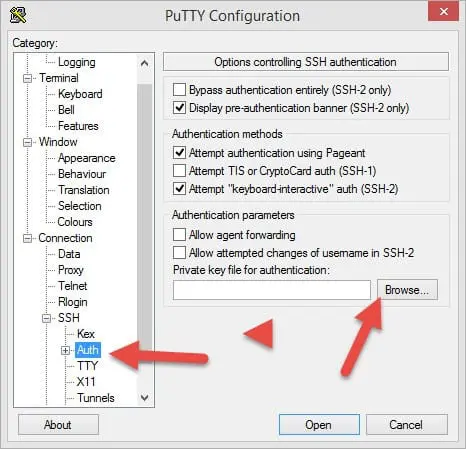
bnixvn doc putty authjpg

Using an SSH key with Linux/macOS

OnLinuxorMacOS, using an SSH key to connect is very simple. You just need to openTerminaland follow the instructions below:

  1. Use the SSH command to connect:
    Enter the following command in the Terminal: ssh -i /path/to/private_key username@server_ip
    • /path/to/private_key: The full path to the private key file you created (usually in~/.ssh/id_rsa).
    • username: The username used to log in to the server (for example:rootor another username).
    • server_ip: The server's IP address or domain name.
  2. Enter the passphrase (if any):
    If your private key is protected by a passphrase, the system will prompt for it. Enter the passphrase to continue connecting.
  3. Verify the connection succeeded:
    Once the details are correct, you will connect to the server without entering a password.

Example:

Suppose you store your private key at~/.ssh/id_rsa, the username isroot, and the server's IP address is192.168.1.100. The command is as follows:

ssh -i ~/.ssh/id_rsa root@192.168.1.100

Note:

  • If your private key file is in the default directory (~/.ssh/id_rsa), you can skip the option-iand simply run:bashCopy codessh username@server_ip SSH will automatically use the key in the default directory.
  • Make sure the private key file has safe permissions (readable only by you):bashCopy codechmod 600 ~/.ssh/id_rsa

With the steps above, you can now use an SSH key to log in to your server securely on Linux or macOS.


HiTechCloud

Hi-Tech Cloud, part of Pho Tue SoftWare Solutions JSC, provides VPS hosting, server hosting, Cloud Server, colocation, hosting and domains — Cloud VPS and servers, Dedicated Servers, Colocation Server, Web Design, source code, plugins and more.

Facebook

Similar Posts

  • HiTechCloud by Pho Tue SoftWare Solutions JSC launches AI Factory in Vietnam, Japan and Korea

    HiTechCloud by Pho Tue SoftWare Solutions JSC launches AI Factory in Vietnam, Japan and Korea

    On 25 January 2025, Pho Tue Software Solutions JSC, a leading NVIDIA partner, launched its AI Factory at…

  • Installing Monarx - a free VPS security tool

    Installing Monarx - a free VPS security tool

    Monarx is a smart platform for protecting a VPS, with central management. It is currently free and works well. The operating…

  • Notice of updates to the Personal Data Protection Policy

    Notice of updates to the Personal Data Protection Policy

    Dear customers and partners, Pho Tue Software and Technology Solutions Joint Stock Company ("Pho Tue…

  • AdGuard Home DNS rewrite syntax

    AdGuard Home DNS rewrite syntax

    Introduction. You can use AdGuard's DNS filtering syntax to create more flexible rules for blocking content…

  • How to recover a MySQL password on Windows and Linux

    How to recover a MySQL password on Windows and Linux

    1. What is a MySQL root password reset? Before getting to the reset itself, you need to understand what MySQL is. MySQL is a database management…

  • Fixing error: db5 error(11) from dbenv->open: Resource temporarily unavailable on CentOS, AlmaLinux, and Rocky Linux

    Fixing error: db5 error(11) from dbenv->open: Resource temporarily unavailable on CentOS, AlmaLinux, and Rocky Linux

    If you hit the error "db5 error(11) from dbenv->open: Resource temporarily unavailable" when using yum or dnf, you can fix it with a single…

Promotions

  • HiTechCloud by Pho Tue SoftWare Solutions JSC launches AI Factory in Vietnam, Japan and Korea

    HiTechCloud by Pho Tue SoftWare Solutions JSC launches AI Factory in Vietnam, Japan and Korea

  • An introduction to the IT.COM domain – an ideal fit for technology companies and developers

    An introduction to the IT.COM domain – an ideal fit for technology companies and developers

  • What is HostBill? A complete customer and billing management solution for web hosting

    What is HostBill? A complete customer and billing management solution for web hosting

  • Multi-cloud strategy for Vietnamese SMEs: risks, benefits and when it is genuinely necessary

    Multi-cloud strategy for Vietnamese SMEs: risks, benefits and when it is genuinely necessary

  • Cloud migration and the cloud continuum as a competitive advantage

    Cloud migration and the cloud continuum as a competitive advantage

  • HiTechCloud by Pho Tue SoftWare Solutions JSC announces a support program for Vietnamese startups worth billions of dong

    HiTechCloud by Pho Tue SoftWare Solutions JSC announces a support program for Vietnamese startups worth billions of dong

Recommended

  • Why your business needs a website

    Why your business needs a website

  • The benefits of deploying VPS instead of dedicated servers

    The benefits of deploying VPS instead of dedicated servers

  • Why a website matters for protecting your brand

    Why a website matters for protecting your brand

  • Digital transformation for business: the benefits and the challenges

    Digital transformation for business: the benefits and the challenges

  • 5 steps to run Google Workspace and Cloud Email side by side at HiTechCloud

    5 steps to run Google Workspace and Cloud Email side by side at HiTechCloud

  • Multi-cloud strategy for Vietnamese SMEs: risks, benefits and when it is genuinely necessary

    Multi-cloud strategy for Vietnamese SMEs: risks, benefits and when it is genuinely necessary

  • What is HiTechCloud IDP? Understanding Intelligent Document Processing and how Vietnamese businesses use it

    What is HiTechCloud IDP? Understanding Intelligent Document Processing and how Vietnamese businesses use it

TRUSTED BY 85,000+ CUSTOMERS IN VIETNAM AND WORLDWIDE

HiTechCloud Partner
HiTechCloud Partner
HiTechCloud Partner
HiTechCloud Partner
HiTechCloud Partner
HiTechCloud Partner
HiTechCloud Partner
HiTechCloud Partner
HiTechCloud Partner
HiTechCloud Partner
HiTechCloud Partner
HiTechCloud Partner
HiTechCloud Partner
HiTechCloud Partner
HiTechCloud Partner
HiTechCloud Partner
HiTechCloud Partner
HiTechCloud Partner
HiTechCloud Partner
HiTechCloud Partner
HiTechCloud Partner
HiTechCloud Partner
HiTechCloud Partner
HiTechCloud Partner
HiTechCloud Partner
HiTechCloud Partner
HiTechCloud Partner
HiTechCloud Partner
HiTechCloud Partner
HiTechCloud Partner
HiTechCloud Partner
HiTechCloud Partner
HiTechCloud Partner
HiTechCloud Partner
HiTechCloud Partner
HiTechCloud Partner
HiTechCloud Partner
HiTechCloud Partner
HiTechCloud Partner
HiTechCloud Partner
HiTechCloud Partner
HiTechCloud Partner
HiTechCloud Partner
HiTechCloud Partner
HiTechCloud Partner
HiTechCloud Partner
HiTechCloud Partner
HiTechCloud Partner
HiTechCloud Partner
HiTechCloud Partner
HiTechCloud Partner
HiTechCloud Partner

PARTNERS IN GROWTH

HiTechCloud Partner
HiTechCloud Partner
HiTechCloud Partner
HiTechCloud Partner
HiTechCloud Partner
HiTechCloud Partner
HiTechCloud Partner
HiTechCloud Partner
HiTechCloud Partner
HiTechCloud Partner
HiTechCloud Partner
HiTechCloud Partner
HiTechCloud Partner
HiTechCloud Partner
HiTechCloud Partner
HiTechCloud Partner
HiTechCloud Partner
HiTechCloud Partner
HiTechCloud Partner
HiTechCloud Partner
HiTechCloud Partner
HiTechCloud Partner
HiTechCloud Partner
HiTechCloud Partner
HiTechCloud Partner
HiTechCloud Partner
HiTechCloud Partner
HiTechCloud Partner
HiTechCloud Partner
HiTechCloud Partner
HiTechCloud Partner
HiTechCloud Partner
HiTechCloud Partner
HiTechCloud Partner
HiTechCloud Partner
HiTechCloud Partner
HiTechCloud Partner
HiTechCloud Partner
HiTechCloud Partner
HiTechCloud Partner
HiTechCloud Partner
HiTechCloud Partner
HiTechCloud Partner
HiTechCloud Partner
HiTechCloud Partner
HiTechCloud Partner
HiTechCloud Partner
HiTechCloud Partner
HiTechCloud Partner
HiTechCloud Partner
HiTechCloud Partner
HiTechCloud Partner
HiTechCloud Partner
HiTechCloud Partner
HiTechCloud Partner
HiTechCloud Partner
HiTechCloud Partner
HiTechCloud Partner
HiTechCloud Partner
HiTechCloud Partner
HiTechCloud Partner
HiTechCloud Partner
HiTechCloud Partner
HiTechCloud Partner
HiTechCloud Partner
HiTechCloud Partner

A handbook for building digital infrastructure with confidence

Help

Start deploying quickly with HiTechCloud

Documentation & supportSupportContactMy HiTechCloudPrivacy

Latest updates

Announcements, in-depth analysis and events

Webinars & events – promotionsBlogsStartup Program at HiTechCloud

International security certifications and standards

HiTechCloud AWS Advanced Tier Partner
HiTechCloud AWS Well-Architected Partner
HiTechCloud AWS DevOps Competency
HiTechCloud AWS 50 Certified
HiTechCloud SAP PartnerEdge
HiTechCloud ISO 9001:2015 – ISOCERT
HiTechCloud security certifications
HiTechCloud data center – Uptime Institute Tier III Design Certified
HiTechCloud data center – Uptime Institute Tier III Facility Certified
HiTechCloud ANSI/TIA-942:2017 Rated 3 Facilities
HiTechCloud TIA-942
ISO 27001
ISO 27017
ISO 27018
HiTechCloud ISO 27001:2013
HiTechCloud ISO/IEC 27010:2019
HiTechCloud ISO/IEC 20000-1:2018
HiTechCloud ISO 22301:2019
HiTechCloud ISO 22301
HiTechCloud ISO 9001:2015
HiTechCloud ISO 14001:2016
HiTechCloud ISO 45001:2018
HiTechCloud ISO Certification
HiTechCloud ISO
ISO 14001:2015
ISO Certified
ISO/IEC 27018 PII Public Clouds
HiTechCloud PCI DSS
PCI DSS
SISA PCI DSS
A-LIGN SOC 2
HiTechCloud AICPA SOC
TVRA
CREST
Cisco CCNP Security
JNCIA Junos
HiTechCloud CMMI
HiTechCloud ISTQB Gold Level
Cyber Security Certification
HiTechCloud Vendorland CRM Consulting 2024
HiTechCloud Top Clutch Salesforce Company Vietnam 2023
HiTechCloud The Manifest Malaysia
HiTechCloud The Manifest AI Most Reviewed
HiTechCloud IT Services Company Most Reviewed
HiTechCloud System Integration Most Reviewed
HiTechCloud IT Services Company Most Reviewed
HiTechCloud The Manifest AI Most Reviewed
HiTechCloud The Manifest Malaysia
HiTechCloud Top Clutch Salesforce Company Vietnam 2023
HiTechCloud Vendorland CRM Consulting 2024
Cyber Security Certification
HiTechCloud ISTQB Gold Level
HiTechCloud CMMI
JNCIA Junos
Cisco CCNP Security
CREST
TVRA
HiTechCloud AICPA SOC
A-LIGN SOC 2
SISA PCI DSS
PCI DSS
HiTechCloud PCI DSS
ISO/IEC 27018 PII Public Clouds
ISO Certified
ISO 14001:2015
HiTechCloud ISO
HiTechCloud ISO Certification
HiTechCloud ISO 45001:2018
HiTechCloud ISO 14001:2016
HiTechCloud ISO 9001:2015
HiTechCloud ISO 22301
HiTechCloud ISO 22301:2019
HiTechCloud ISO/IEC 20000-1:2018
HiTechCloud ISO/IEC 27010:2019
HiTechCloud ISO 27001:2013
ISO 27018
ISO 27017
ISO 27001
HiTechCloud TIA-942
HiTechCloud ANSI/TIA-942:2017 Rated 3 Facilities
HiTechCloud data center – Uptime Institute Tier III Facility Certified
HiTechCloud data center – Uptime Institute Tier III Design Certified
HiTechCloud security certifications
HiTechCloud ISO 9001:2015 – ISOCERT
HiTechCloud SAP PartnerEdge
HiTechCloud AWS 50 Certified
HiTechCloud AWS DevOps Competency
HiTechCloud AWS Well-Architected Partner
HiTechCloud AWS Advanced Tier Partner

Ready to get started with HiTechCloud

Start building with HiTechCloud and shape a complete AI and cloud strategy

Start now

Sign in to explore an ecosystem of over 30 products and utilities designed for you

Get started

Talk to an expert

Connect with our sales team and explore optimal AI & Cloud solutions for your enterprise

Contact sales
Support hotline0865.920.041
Submit a ticketTechnical support online 24/7
Support documentationFind every guide you need at HiTechCloud

FEATURED SERVICES

  • Cloud Instances
  • GPU Instances
  • Cloud Storage
  • GPU Clusters
  • Kubernetes (VKS)
  • AI Platform
  • Colocation
  • Backup Center
  • vMonitor Platform
  • vCDN

Services

  • Domains
  • Cloud Instances
  • GPU Instances
  • Colocation
  • Dedicated Server VN
  • Vstorage
  • HiTechMail
  • Email Server
  • SSL

Solutions

  • vCloudstack
  • Managed Services
  • vMKS Kubernetes
  • Microsoft 365
  • Google Workspace
  • Intelligent Document Processing (IDP)
  • AgentBase
  • MaaS
  • AI Platform
  • Multi Availability Zone
  • Multi-cloud
  • Retail & E-commerce

Company

  • About us
  • Support and complaints
  • Service support
  • Service management portal
  • Terms of Service
  • Information security policy
  • Service quality commitment
  • Payment methods
  • Affiliate program
  • Partner & reseller program
  • Careers
  • Check job application status
  • Saved jobs
  • Job alerts
  • Service status
  • Events & webinars
  • Glossary
  • Cost estimate

Head office

Pho Tue Software Solutions JSC

128 Binh My Street, Binh My Commune, Ho Chi Minh City, Vietnam

Tax code: 0318222903, first issued on 20/12/2023 by the Ho Chi Minh City Department of Planning and Investment (now the Ho Chi Minh City Department of Finance), amended for the 2nd time on 15/10/2024

D-U-N-S Number: 557339920

Responsible for content: Nguyễn Thanh An

Contact information

Hotline: 0865.920.041

Email: info@photuesoftware.com

Email Abuse: abuse@photuesoftware.com

Certificate: Telecommunications service registration certificate No. 18/GCN-SKHCN, issued by the Ho Chi Minh City Department of Science and Technology on March 10, 2026.

Quick support channels

HiTechCloud Zalo OA QR codeZalo OAHiTechCloud Zalo support QR codeZalo supportHiTechCloud WhatsApp QR codeWhatsApp

Offices

Southern Regional Office

Unit OT03, The Landmark 81, 720A Dien Bien Phu Street, Vinhomes Tan Cang, Thanh My Tay Ward, Ho Chi Minh City, Vietnam

Da Nang Representative Office

ICT Building, Software Park No. 2 (ICT Tower), Nhu Nguyet Street, Hai Chau Ward, Da Nang City, Vietnam

Northern R&D Center

Opening scheduled for September 2026

Tokyo office

5F, Ginza Sky Building, 3-13-4 Ginza, Chuo-ku, Tokyo, Japan

Email: contact.jp@hitechcloud.asia

Korea office

6F, Yanghwa Tower, 5 Teheran-ro 20-gil, Yeoksam-dong, Gangnam District, Seoul, South Korea

Email: contact.korea@hitechcloud.asia

Osaka office

5F, Sugimoto Building, 1-4-7 Tokui-cho, Chuo-ku, Osaka, Japan

Email: contact.jp@hitechcloud.asia

Fukuoka office

7F, ONE FUKUOKA BLDG, 1-11-1 Tenjin, Chuo-ku, Fukuoka, Japan

Email: contact.jp@hitechcloud.asia

Sydney office

81-83 Campbell Street Surry Hills, NSW 2010, Australia

Email: sydney@hitechcloud.asia

California office

150 E Brokaw Rd, San Jose, CA 95112, United States

Email: contact.us@hitechcloud.asia

Singapore office

36 Robinson Road, #20-01, City House, Singapore 068877

Email: contact.sgp@hitechcloud.asia

Dubai office

Mezzanine Floor, Jumeirah Living Marina Gate 3, Dubai Marina, Dubai, PO Box 121828

Email: contact.dubai@hitechcloud.asia

Website certifications

Registered with Vietnam MOITGoogle Cloud PartnerMicrosoft PartnerGreenNode AI Platform PartnerMembership RIR
HiTechCloud
HiTech ApexaHiTech CoderHiTech PayHiTech POSvKai.VNSME Box

Payment methods

ZaloPayMasterCardVisaMB BankJCBHiTech Pay
HiTechCloud

Copyright 2018-2026 All rights reserved by HiTechCloud by Pho Tue SoftWare Solutions JSC.
"HiTechCloud clearly and consistently affirms: The Hoang Sa (Paracel) and Truong Sa (Spratly) archipelagos are sacred and inseparable parts of Vietnam's territory. We respect and uphold the sovereignty and territorial integrity of the Fatherland."